


Soundmap - Find Your Songs
4.54.14K Reviews
App Specs
- Version
- 2.18.1
- Updated On
- License
- Free
- Downloads
- 500,000+
- Developer
- SuperStar Labs
- Categories
- Music & Audio
- Platform
- Android
Screenshots
 Analysis by AppCompare
If you're anything like me, finding new music is an endless quest. Sure, there are plenty of apps out there, but they often feel like they're just throwing random songs at you. Enter Soundmap - Find Your Songs, an app that promises to change how we discover music. I decided to dive into this app to see if it truly hits the right notes.
How I’d Build a Useful Discovery Routine
For me, the best way to approach a discovery app is to give it a clear job instead of expecting it to replace every music tool I use. Soundmap is a music and audio app from Sincerely Studios Inc., and its map-based idea works best when I treat it as a way to explore scenes and conversation around songs, then decide what deserves a place in my regular listening. It is free to install, though optional in-app purchases range from $0.99 to $499.99 per item, so I would check purchase details carefully before confirming anything.
A realistic routine might be to open the map during a quiet break, look around a place I’m curious about, and save or follow up on a track that catches my attention. Later, I can listen more deliberately through a connected service, rather than trying to judge a song from a quick glance while distracted. That two-step habit makes discovery feel less like endless scrolling and more like keeping a small list of leads to revisit.
The map is also a useful prompt when my usual listening has become repetitive. Instead of asking an algorithm for more music that resembles what I already play, I can use location as a different starting point. I would not assume that a map view automatically represents a complete picture of a city’s music; I see it as a way to stumble across possibilities and then use my own ears to decide what fits.
Settings and Choices That Shape the Experience
When I first set up any discovery app, I try to be honest about what I actually want to hear. Here, selecting genres that genuinely interest me gives recommendations a better starting point than choosing every category just to see what happens. If my taste changes, revisiting those choices is more useful than blaming the app for continuing to surface a narrow range.
I also think about how much social activity I want. Following friends and seeing their listening can make the experience more personal, but it changes the app from a solo browsing tool into a shared one. If I want a quieter session, I can focus on exploring and save social browsing for when I have time to respond or follow a recommendation back to its source.
One practical detail is the connection to Spotify or Apple Music. Linking a streaming service can make it easier to move from discovery to full listening and to add a find to a playlist, but it is not essential to the basic idea of exploring music. I would connect the service I actually use, rather than setting up several accounts just because the options are there. That keeps the path from “interesting” to “play this again” simple.
Worth Reading Before You Choose

Flipboard Shows What News Apps Must Do Beyond the Feed

Switching to Android Auto Means Rethinking Your Driving Routine

Google Calendar Makes a Crowded Week Easier to Manage

Ludo King Makes the Most of the Minutes Between Plans

Baby Panda World Brings Quick Play to Modern Phones, but Its Game Library Feels Busy

ESPN’s Live Game View Makes Following Close Games Easier
First Impressions: A Sleek Interface
The first thing that struck me about Soundmap - Find Your Songs was its sleek, intuitive interface. From the moment you open it, you’re greeted with a clean design that makes navigation a breeze. It’s like the app is inviting you to explore without overwhelming you with too many options.
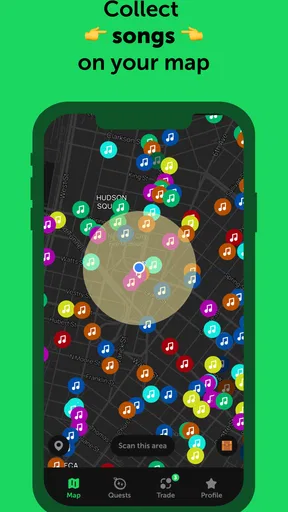
The home screen features a dynamic map that visually represents music trends and popular tracks around different locations. This is a refreshing departure from the usual list or grid view, and it immediately piques your curiosity about what's playing where. The map interface is interactive, so you can zoom into different areas to discover local favorites. It’s like a musical treasure hunt!
Diving into Features: Beyond the Basics
So, what makes Soundmap stand out? Well, it’s more than just another music discovery tool. The app uses a combination of algorithms and user data to provide personalized recommendations. You can start by selecting genres you’re interested in, and the app does the rest. I was impressed by how quickly it adapted to my tastes.
One feature I found particularly cool is the ability to create playlists based on current trends in specific locations. For instance, if you’re curious about what’s trending in Tokyo, you can easily access a playlist that reflects the local vibes. It’s like having a global DJ at your fingertips!
The app also integrates seamlessly with streaming services like Spotify and Apple Music. This means you can listen to full tracks and add them directly to your existing playlists without leaving the app. It’s a small detail, but it makes a big difference in user experience.
A Faster Way to Explore Without Turning It Into a Chore
Once I know what I’m looking for, I try not to treat every map visit as a full listening session. I use a quick pass to spot an unfamiliar artist or an interesting location, then make a mental note to return to the track when I can give it proper attention. That small boundary matters: otherwise, a discovery tool can become another feed I scroll through without actually listening.
Another useful habit is to follow a discovery with one deliberate action. I might add a track to a playlist, check what else the person who shared it listens to, or move on if it does not click. The point is not to collect everything. Soundmap is more rewarding when I use its social and map elements to uncover leads, then let my own listening decide which ones are worth keeping.
For a commute or a short break, I would browse in advance rather than constantly switching between the map and a full track. That keeps attention on the music and avoids making a small pocket of free time feel like a task. If I am in a place where I cannot listen properly, I can still explore, but I save judgment for later instead of confusing a quick preview with a real impression.
Community and Interaction: Connecting Through Music
What’s music without a community, right? Soundmap nails this aspect by offering a social feature where users can share their discoveries and interact with others. You can follow friends, see what they’re listening to, and even comment on their playlists. It’s a nice way to build connections through shared musical interests.
The app encourages users to contribute by tagging songs they love and adding them to the map. This crowd-sourced data enriches the experience for everyone, making the map a living, breathing entity. It’s fascinating to see the diversity of music from different corners of the world.
Where the Map Helps—and Where Other Music Apps Win
Compared with a conventional streaming app, Soundmap gives me a more place-oriented way to encounter music, while a streaming service is usually better for playing albums, organizing a library, or starting a familiar playlist quickly. I would not replace my everyday music player with it. I would use the map when I want a new angle on discovery, then rely on my preferred listening service for longer sessions and saved favorites.
It also differs from a straightforward recommendation feed. A feed can be convenient when I want something similar to a track I already like; exploring by location is more open-ended and can feel less predictable. That unpredictability is a strength when I’m curious, but a drawback when I have a specific mood or artist in mind and simply want a reliable queue.
The social side is most valuable when people I know actually share things I want to explore. If I prefer music discovery to be private, or if I have no interest in following other listeners, that layer may add little. In that case, a standard streaming service’s search and recommendation tools might be a better fit, with Soundmap reserved for occasional map browsing rather than daily use.
Performance and Usability: Smooth Sailing
Performance-wise, Soundmap is a smooth operator. During my time testing it, I didn’t encounter any crashes or significant lag. The app loads quickly, and the transitions between different sections are fluid. It's clear that the developers have put a lot of thought into optimizing the app for a seamless experience.
Usability is another area where Soundmap shines. The controls are straightforward, and the learning curve is minimal. Even if you’re not tech-savvy, you’ll find yourself navigating the app with ease. The help section is comprehensive, providing clear answers to any questions you might have.
Limits to Keep in Mind Before You Settle Into It
A map can make music feel connected to places, but it also asks me to enjoy browsing as part of the experience. If I want an instant, uninterrupted soundtrack, I would open a player built around playback rather than spend time exploring. Likewise, recommendations depend on the choices and listening activity that shape them, so I would give the app a little time and make thoughtful genre selections before deciding whether its suggestions suit me.
Soundmap is rated Teen, and it runs on iOS 8.0 or later. Its current version is 2.9.8. Those details make it easier to judge basic compatibility, while the optional purchases are worth keeping in mind for anyone who prefers to avoid spending inside apps. The app is free to get started, but I would still review any purchase screen carefully and keep the experience within my own budget.
Its audience figures suggest that it has found a substantial community: it has more than 500,000 installs, an average rating of 4.5 from around 100,000 ratings, and about 4,000 written reviews. I treat those numbers as context, not as a guarantee that every listener will enjoy the same workflow. A popular social discovery app can still be a poor match for someone who wants a private, purely playback-focused experience.
Final Thoughts: A Game-Changer in Music Discovery
In a crowded market of music apps, Soundmap offers something genuinely unique. Its innovative approach to music discovery through a geographical lens sets it apart from the rest. The app excels in creating a personalized experience while fostering a sense of community among music lovers.
Whether you’re a casual listener or a hardcore music enthusiast, Soundmap has something to offer. It’s a delightful blend of technology and creativity, making music discovery an exciting journey rather than a mundane task. Give it a try, and you might just find your new favorite song—or a whole playlist of them!
Who I’d Recommend It To
I would recommend trying it if you enjoy wandering into unfamiliar music, like seeing what other listeners are sharing, or want a discovery routine that does not begin and end with the same artist radio. It is especially appealing to curious listeners who are happy to spend a few minutes exploring and then carry promising finds into the streaming app they already use.
I would skip it, or keep it as an occasional extra, if my priority were a dependable offline library, hands-free playback, or a fast route to a familiar album. Those are different jobs, and a map-led social discovery app is not the best tool for all of them. For me, Soundmap is most satisfying when I approach it with curiosity, keep my recommendations grounded in my real taste, and treat each discovery as an invitation rather than an obligation.
Pros
- Intuitive user interface for easy navigation.
- Extensive library with diverse music genres.
- Seamless integration with social media platforms.
- High-quality audio streaming without interruptions.
- Regular updates with new features and improvements.
Cons
- Limited offline mode functionality.
- Occasional app crashes on older devices.
- Subscription required for premium features.
- Ads can be intrusive in the free version.
- Some songs are unavailable in certain regions.
FAQs for Soundmap - Find Your Songs
What is Soundmap and how does it work?
Soundmap is a music discovery app that helps users find new songs by mapping them based on your listening preferences and location. Once installed, the app analyzes your music taste and suggests songs and playlists that align with your interests. It also shows trending music in your area, making it a unique way to discover local favorites.
Is Soundmap available for both Android and iOS devices?
Yes, Soundmap is available for both Android and iOS platforms. Users can download the app from Google Play Store for Android devices and the Apple App Store for iOS devices. The app is designed to offer a seamless experience across different devices, ensuring that everyone can enjoy discovering new music.
Does Soundmap require an internet connection to function?
Yes, Soundmap requires an internet connection to function effectively. The app needs access to online music databases and your location to provide accurate recommendations and updates on trending music. While some features might be accessible offline, a stable internet connection is necessary for the best user experience.
Can I create and share playlists with Soundmap?
Absolutely! Soundmap allows users to create personalized playlists based on their music discoveries. You can also share these playlists with friends and other users within the app. This feature enhances the social aspect of music discovery, allowing you to explore a diverse range of songs curated by others.
Is there a premium version of Soundmap, and what are its benefits?
Yes, Soundmap offers a premium version that provides several benefits, such as an ad-free experience, higher quality audio streaming, and exclusive access to special features like advanced song recommendations and early access to new app updates. Subscribing to the premium version enhances the overall user experience for avid music enthusiasts.


